Free lead tracking · Activate Wedding Suite per wedding

Procession & Seating

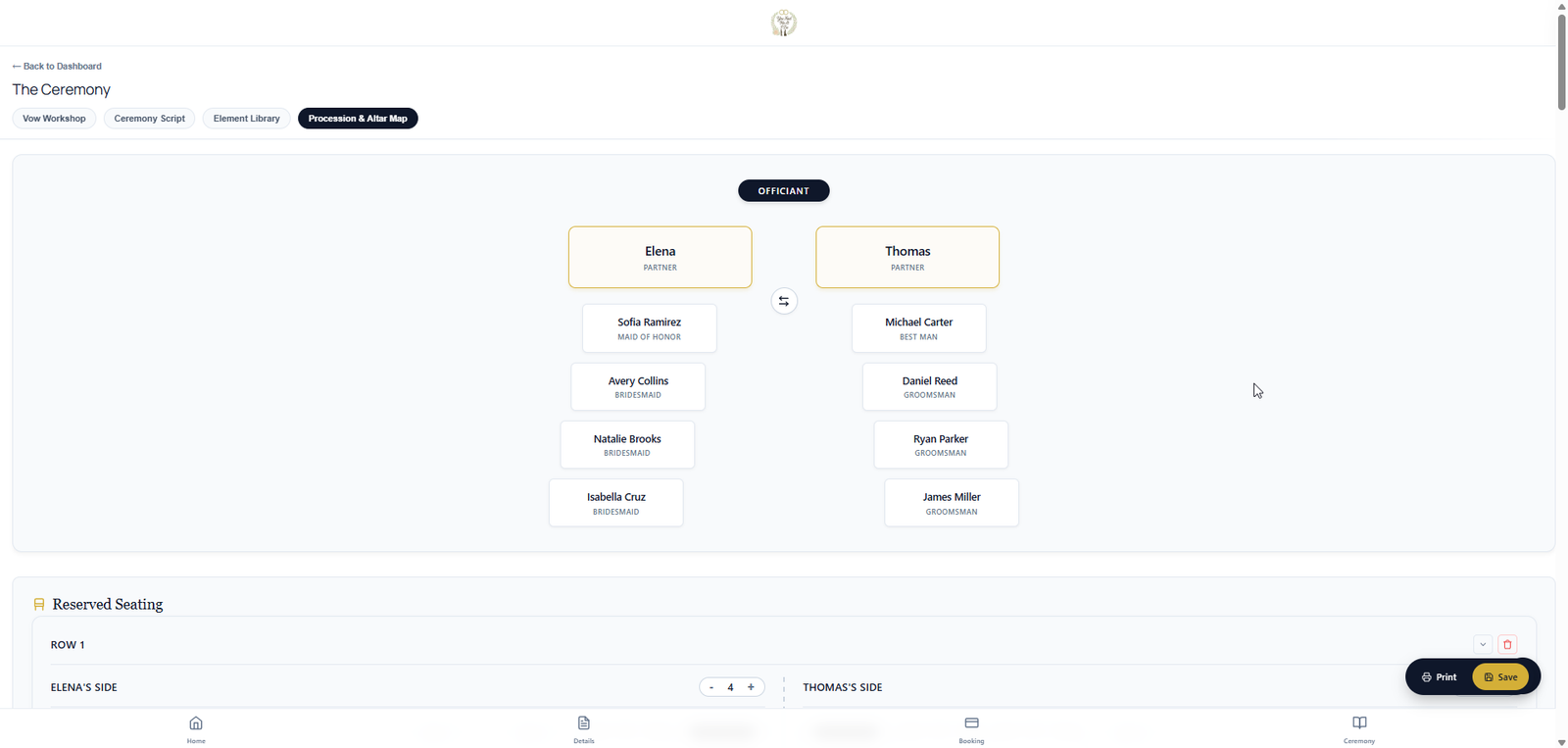
Work out walking order, reserved seating, and altar positions with the couple before the rehearsal. Then carry the same plan into VIP portals and day-of mode.

2 Wedding Suite activations included · No credit card required

Wedding Suite · You & the couple

Procession, seating & altar planning — together
Walking order. Seating chart. Altar positions.

Stop juggling spreadsheets and text threads. You and the couple plan the ceremony layout in one place — walking order for the procession, who sits where, and where everyone stands at the altar. The couple works in the couple portal on their own time; you refine, approve, and publish to VIPs and day-of mode when you're ready.

  • Procession — build the walking order together; couple and officiant stay on the same plan
  • Reserved seating — mark family rows, VIP sections, and special seats; publish to VIPs when you're ready
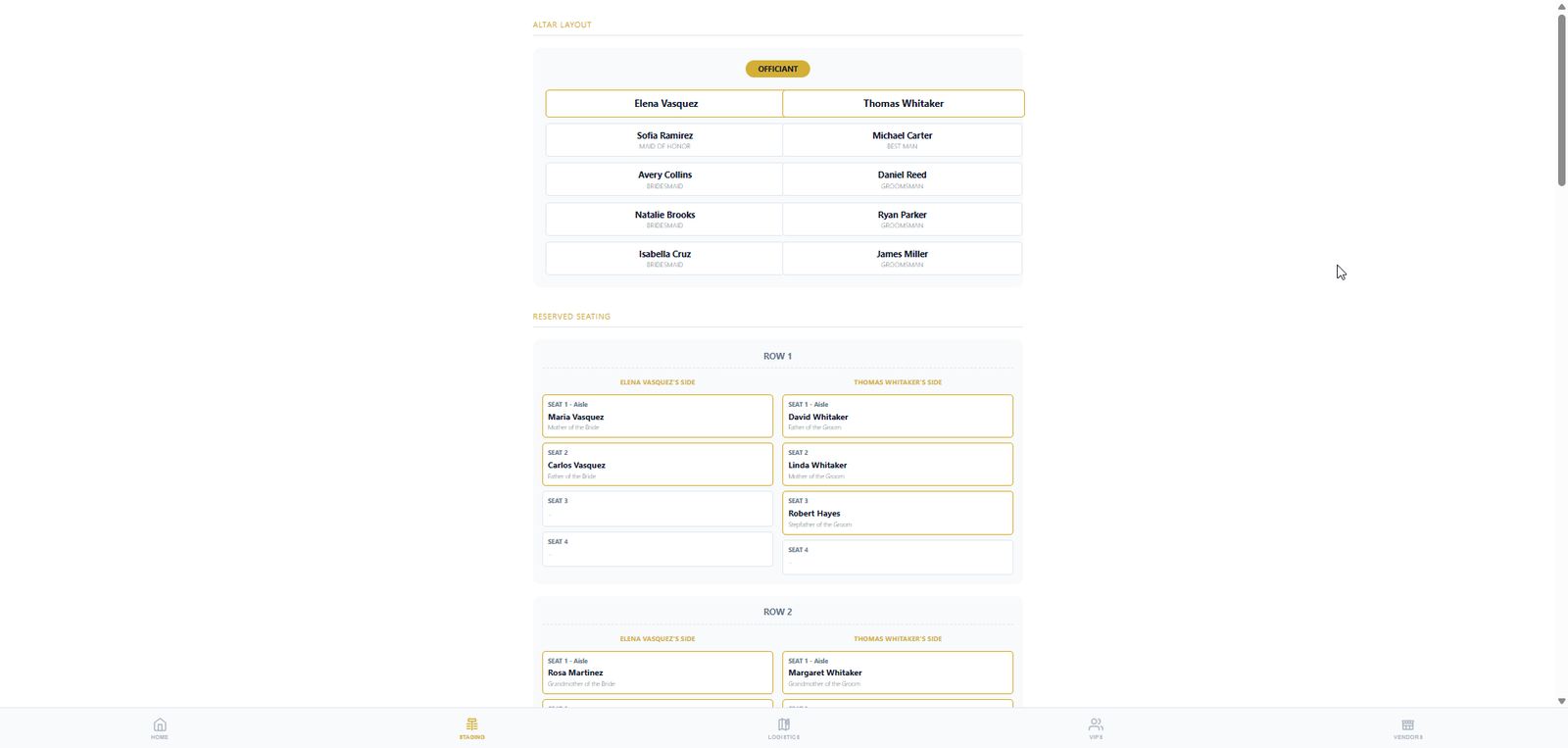
  • Altar positions — place the wedding party at the altar before ceremony day
  • Couple portal + your studio — couples plan on their schedule; you control what they can edit
  • VIP portal shows procession, seating & altar — shareable link or QR for wedding-party access
  • Flows straight into day-of mode on your tablet — no retyping at the venue

Couples help gather the VIP and wedding-party details; you keep the final say on what the wedding party and VIPs see.

Same plan on your tablet at the altar — procession, seating, and altar tabs in day-of mode.

Ceremony logistics

The details that usually live in text threads

Procession and seating are where wedding-day confusion starts. This page should sell the operational relief: one shared plan, controlled by the officiant, visible to the right people when it is ready.

Walking order

Build the processional order row by row, including pairs, roles, family, wedding party, children, and special cases.

Reserved seating

Map VIP seating so family, honored guests, and special instructions are clear before guests arrive.

Altar positions

Plan who stands where so the officiant, couple, attendants, readers, and vendors know the layout.

Publish when ready

Share the final version to VIPs and day-of mode instead of exposing half-finished plans.

Couples always have a portal — light before activation, full after. Free lead tracking is their contact info, ceremony details, and The Story of You, plus your inquiry list and studio prep. Wedding Suite unlocks vows, ceremony tools, contracts, payments, and guest, VIP, and vendor portals.

Free Light couple portal (free)

  • Light couple portal — couple contact info: name, address, phone, email
  • Light couple portal — ceremony & rehearsal location, date, and time
  • Light couple portal — The Story of You: how they met, about them, and the wedding they want
  • Your studio — lead list with manual statuses (Inquiry, Contract sent, Deposit received, Booked, and more)
  • Your studio — prep pricing & contract templates; quotes, contracts & payments go live when you activate Wedding Suite

Wedding Suite When you activate (1 credit)

  • Ceremony script — element library with optional couple browse & favorites; officiant-only cues stay private
  • Packages, contracts, e-signatures, deposits, balances, and secure payment links beside the ceremony workspace
  • Day-of mode — tablet altar script, walking order, dark mode, text sizing, and offline backup
  • Checklists & to-dos — private (officiant/company) or public for the couple; they can add their own items like pick up the dress or get fitted for the tux
  • Guest, VIP & vendor portals — shareable links or QR codes
  • Messaging & automated reminders for the couple, VIPs, and vendors

Each portal below goes live when you activate Wedding Suite

Wedding Suite

Guests

The digital program

  • Ceremony program & order of events
  • Day-of schedule
  • Vendor & vendor-contact list
  • Shareable link or QR for on-site access
Wedding Suite

VIPs

Everything guests see, plus…

  • Published procession order & walking lineup
  • Reserved seating chart for the wedding party
  • Altar positions — who stands where
  • Shareable link or QR for VIP portal access
Wedding Suite

Couples

The couple's full portal

  • Magic Import messy VIP lists — then plan procession, seating & altar with your officiant
  • Vow Workshop — private vows with length matching and optional writing help
  • Vows, questionnaires & custom checklists
  • Ceremony collaboration & library access (when you allow it)
  • Quotes, contracts, payments & messaging
  • Self-serve planning — anytime, anywhere
Wedding Suite

Vendors

Day-of timeline for vendors

  • Live run-of-show timeline
  • Ceremony script cues
  • Digital rolodex — tap to call anyone on site
  • Shareable link or QR for vendor portal access

Stop rehearsing from memory

Start free, then activate Wedding Suite when a wedding needs procession, seating, VIP portals, and day-of execution.

Scroll to Top